
Earthquake Distortion Device — Quick Start
Memory multiband saturator · VST3 · AU · AAX · macOS & Windows
The idea
Earthquake Distortion Device splits your signal into frequency bands and drives each through a saturation model. What sets it apart is memory: a clay terrain accumulates the spectral energy of your signal over time and fractures where energy piles up. That damage gates how hard each band is driven — so an identical input saturates differently depending on what came before. The distortion has a memory (hysteresis), like real material fatiguing under stress.
How the chain works. The signal is split into 12 bands. Each band's saturated copy is brought back to the band's own level (unity gain), and the terrain's Damage sets how much of it is let through — an un-fractured band stays clean, so an idle terrain adds nothing. Drive is relative to each band's level, so quiet and loud passages distort alike at a given setting; as Drive rises, a full-band collapse stage opens progressively on top. The result then runs in series through the model's colour stage and the Density output clipper. Like the rest of the engine, both follow the terrain's activity: an idle terrain leaves the plugin fully transparent, whatever the knobs say. Density only starts compacting peaks once the ground actually fractures.
Install & activate
1. Run the installer (macOS .pkg / Windows). It installs VST3, AU (mac) and AAX. 2. Open the plug-in in your DAW — it's fully featured for 14 days. 3. To activate: click the gear icon → Import License… → select the .license file from your purchase email. Unlocks instantly, offline.
The interface
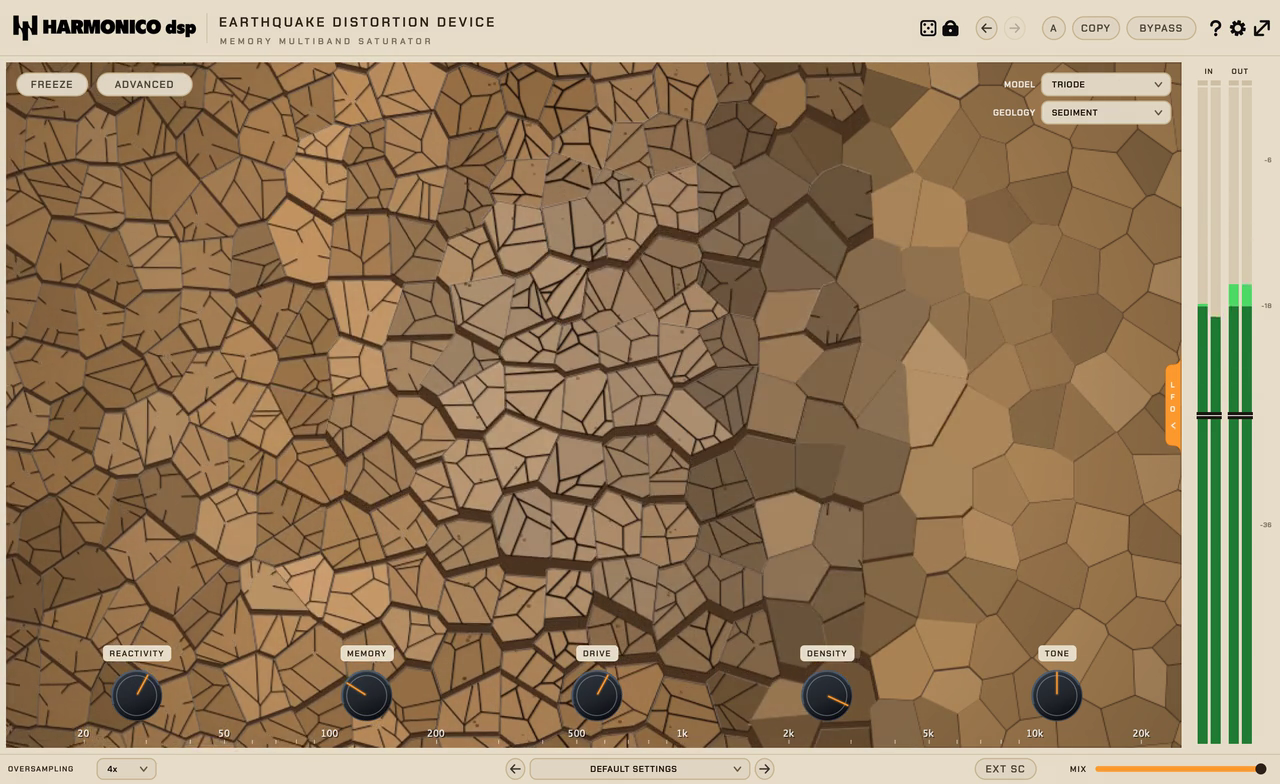
- Top bar — Model, Geology, Freeze, A/B, Copy, Bypass, gear (settings), IN/OUT meters.
- Centre — the living terrain. It fractures where spectral energy builds up.
This is a visualisation, not a control — read it to see what the memory is doing.
- Bottom knobs (left → right) — Reactivity, Memory, Drive, Density, Tone.
The ADVANCED pill (top-left, next to Freeze) reveals Propagation, Tilt and Bias.
- Bottom bar — Oversampling, preset menu, Ext SC, Mix.
Controls
| Control | What it does |
|---|---|
| Model | The saturation character — 12 models (see below). |
| Geology | The ground material — it doesn't replace your knobs, it modulates the terrain laws (fracture threshold, heal/fracture speed, how far shocks spread). See the four grounds below. |
| Reactivity | How easily the terrain fractures — turns energy sensitivity up and the fracture threshold down (things break sooner). Default is 0.35, enough to keep the terrain busy at mix level: raise it to make it break sooner. Not a speed control. |
| Memory | How long damage persists (the hysteresis) — this is your time-evolution / character knob. About 1 second at 0 %, 1 minute at 100 % on Sediment (Basalt heals slower, Sand faster). |
| Propagation (ADVANCED) | How far a fracture spreads to neighbouring bands. Low = localised; high = the whole spectrum reacts together. |
| Tilt (ADVANCED) | Weights where the action lands along the spectrum (bass-weighted ↔ treble-weighted); centre is neutral. |
| Drive | Drive into the saturation — the main "how much". |
| Density | Serial output clipper on the whole signal (not added harmonics): unity at small signal, only the peaks get shaved — lowers the crest, densifies and glues. Follows the terrain's activity: idle terrain = fully transparent, and it fades in as the ground fractures. |
| Tone | Brightens/darkens only the added harmonics (never the dry) — lighten the distortion without thinning the fundamental. |
| Bias (ADVANCED) | Shapes the curve's asymmetry — adds even-harmonic content (analog-style thickness). |
| Freeze | Locks the current terrain so it stops evolving — for a fixed texture. |
| Ext SC | Fracture the terrain from an external sidechain instead of the input. |
| Oversampling | 1× / 2× / 4× (default) / 8× — higher internal rate for cleaner highs on aggressive settings (more CPU). |
| Mix | Dry/wet (parallel saturation). There is no auto-gain: the saturation keeps each band at its own level, and the OUT meter trims whatever is left. |
The four grounds (Geology)
- Sediment — neutral default, your baseline identity.
- Basalt — hard: breaks rarely but intensely, stays local, long memory (great for "only the loud hits break up").
- Ice — cracks on a whisper and chains across bands (brittle, cascading).
- Sand — wide, shallow, almost no memory (soft, diffuse colour).
The 12 models
- Triode · Tape · Transistor · Pentode · Transformer — warm/analog family, subtle → thick.
- Fuzz — hard clip: extreme, torn, almost square-wave, aggressive and raw.
- Wavefold — folding, synth-like harmonic richness.
- Waveshape — Chebyshev polynomial shaping (adds specific harmonics), not folding.
- Rectifier — full-wave (octave-up flavour).
- Sinkhole · Fractal · Lorenz — experimental / chaotic shapers for sound design.
LFOs & modulation
Two assignable LFOs live in the drawer on the right edge (click the LFO tab).
- ASSIGN — click, then click any knob to route the LFO to it (several targets
per LFO are fine). CLEAR removes the routing; the modulation rings on the knobs show depth at a glance.
- RATE / DEPTH / PHASE — speed (free Hz or synced divisions), amount, offset.
- SYNC — locks the LFO to the host transport: cycles land on the beat
during playback (PHASE shifts the downbeat), so what you hear is what bounces.
- LFO routings are saved with presets and the A/B slots, and cleared by
DEFAULT SETTINGS.
Quick recipes
- Bus glue & warmth — Model Transformer + Sand geology, Drive low (~0.3), Mix ~45 %. (Or Tape, Drive ~0.45, Mix ~65 %.)
- Drums that break only on accents — Model Transistor or Triode + Basalt geology (Basalt's high threshold is what makes only the loud hits fracture — not low Propagation).
- Evolving texture (sound design) — Model Lorenz, Reactivity ~0.6, Memory high, Drive ~0.6, then Freeze to lock a moment. (Reactivity must be up or there's nothing to freeze.)
Tips
- Reactivity wakes it up (default 0.35), then Memory gives it character. Reach for those two first.
- If it feels harsh, raise Oversampling to 8×.
- Use Basalt (or lower Reactivity) to break only on loud hits; Ice to make everything crackle.
- Level creeping up as you push Drive? Drag the OUT meter down to trim it.
Specs & support
VST3 · AU · AAX — macOS & Windows. 14-day full trial. Questions? See the contact page on harmonicodsp.com.